If you’re running Google Ads for a tree service business, keyword research is the key to connecting with customers actively searching for help. Without it, you risk wasting money on irrelevant clicks or missing out on high-intent leads. Here’s what you need to know:
- Tree service keywords are expensive: Costs range from $10 to $40 per click, with some exceeding $50 in competitive areas.
- Focus on high-intent keywords: Terms like "emergency tree removal near me" or "licensed arborist" attract customers ready to hire.
- Use tools like Google Keyword Planner: Analyze search volumes, costs, and competition to find the best keywords for your campaigns.
- Target local and specific queries: Include city names, zip codes, and long-tail keywords like "stump grinding cost [city]" to reach nearby customers.
- Organize campaigns by service type: Group keywords into categories (e.g., Tree Removal, Stump Grinding) and use negative keywords to block irrelevant traffic.
Pro Tip: Regularly review performance metrics like Click-Through Rate (CTR) and Cost Per Lead (CPL) to refine your strategy and avoid wasted ad spend.
This guide breaks down how to find the right keywords, structure campaigns, and optimize for better results. Let’s dive in.
Tree Service Marketing | PPC Strategies for Tree Service Google Ads Campaign
Know Your Services and Customers
Before diving into keyword research, it’s crucial to understand two things: the services you offer and the problems your customers are trying to solve. This means clearly defining your offerings and pinpointing the situations that lead clients to seek your help.
List Your Core Tree Services
Start by outlining the tree services you provide. These might include tree removal, tree trimming, stump grinding, emergency cleanup, tree health assessments, wood chipping, or tree transplanting. These service names will act as your foundation – or "seed keywords" – for building targeted campaigns.
To keep things organized, group these services into broader categories, such as Tree Removal, Emergency Services, Tree Trimming, or Stump Services. This structure not only makes your services easier to understand but also helps create focused ad groups that can boost your ad performance and conversion rates.
Additionally, consider using professional terms like "Certified Arborist", "Tree Surgeon", or "Licensed Tree Service" in your messaging. These descriptors appeal to customers who value expertise and safety, often more than simply finding the cheapest option.
Once you’ve listed your services, think about how they align with the specific problems your customers are trying to solve.
Identify Customer Problems
Put yourself in your customer’s shoes. What challenges are they facing? For example, someone searching for "emergency tree removal after storm" likely has an urgent safety concern, while someone typing "tree trimming estimates" is probably planning ahead and comparing options.
"A person searching for ’emergency tree removal after storm’ has completely different needs than someone poking around and looking for ‘tree trimming estimates.’" – Tree Leads On Demand
Focus on problem-specific keywords like "dead tree removal", "leaning oak tree help", "branches touching power lines", or "tree fell on house." These phrases attract customers who are ready to hire a professional immediately. At the same time, use negative keywords like "DIY tree removal" or "free tree cutting" to filter out searchers who aren’t looking for professional help.
Given that 87% of customers research tree services online before making a call, your keywords should address both urgent concerns (like safety) and routine inquiries (like pricing, insurance, and credentials). Aligning your keywords with these needs ensures you’re reaching high-intent searchers who are ready to act.
Tools for Keyword Research
Once you’ve got a clear list of services and a solid understanding of customer challenges, it’s time to dive into keyword research. Using the right tools can help you uncover what your prospects are searching for, giving you insights into search volumes, competition levels, and even cost-per-click (CPC) estimates. This information is key to optimizing your marketing budget.
Use Google Keyword Planner
Google Keyword Planner (GKP) is a great starting point – it’s free and pulls data straight from Google’s search engine. To access it, you’ll need a Google Ads account.
Once inside, switch to Expert Mode. From there, you can choose your starting point – either by entering specific keywords or using a website as a reference. Narrow down your search by filtering results to focus on your service area, which will help you avoid misleading national averages. The "Refine keywords" panel is especially useful for organizing ideas by category. If you’re new to this, look for keywords labeled as having "Low" or "Medium" competition. These are generally easier to rank for and come with lower bid costs.
Another helpful feature is the "Forecast" tab, which lets you estimate potential clicks and conversions based on your budget before spending a dime.
It’s worth noting that GKP shows search volume in broad ranges (e.g., 100–1,000 or 10,000–100,000 searches) instead of exact numbers. Also, its "Competition" metric reflects the level of competition for paid ads, not organic rankings.
Try Additional Research Tools
While Google Keyword Planner is a solid starting point, other tools can provide deeper insights – especially when it comes to local targeting or analyzing competitors. Platforms like SEMrush, Ahrefs, and Moz offer advanced features like hyperlocal filters and keyword difficulty scores, helping you refine your research.
For inspiration, tools like AnswerThePublic and AlsoAsked are fantastic for uncovering common questions people search for – like "how much does tree removal cost?" or "when is the best time to prune oak trees?" These can spark ideas for blog topics or informational ad campaigns.
If you’re curious about what keywords your local competitors are using, SpyFu can be a game-changer. It lets you dig into up to 10 years of their PPC keyword history. As Rambod Yadegar, President of HawkSEM, explains:
"When conducting keyword research, it is prudent to use multiple tools and not rely on a single source".
Using a mix of tools can help you expand your keyword list and make more informed decisions before finalizing your strategy.
Check Google Search Features
Don’t overlook the free insights Google itself provides. Start typing a service like "tree removal near" into Google’s search bar, and Autocomplete will suggest popular queries based on real user searches in your area.
Pay attention to the "People Also Ask" section, which often highlights customer concerns. For instance, searching for "tree trimming" might reveal questions like "How often should I trim my trees?" These insights can guide your content strategy and help you address what your audience cares about.
Google Trends is another useful tool, especially for spotting seasonal patterns. For example, searches for "emergency tree service" tend to spike after storms, while "tree pruning" sees increased interest during late winter. Understanding these trends can help you plan ad spending and promotions to align with seasonal demand.
Target High-Intent and Local Keywords
Once you’ve gathered keyword ideas using research tools, it’s time to narrow your focus on queries that drive immediate customer action. Why? Because almost half of all Google searches have a local intent, and 28% of those searches lead to a purchase within just 24 hours. For tree service businesses, targeting high-intent local keywords can connect you with customers ready to take action.
Focus on Local Keywords
Local keywords are your gateway to reaching customers in your service area who are actively searching for help. These keywords fall into two main categories: implicit and explicit.
- Implicit keywords, such as "tree trimming", don’t include a location but rely on Google’s location data to match users with nearby services.
- Explicit keywords, like "tree removal in Miami" or "arborist [zip code]", include a specific location, signaling even stronger local intent.
To capture hyper-local demand, include neighborhoods, zip codes, and even local landmarks in your keyword strategy. For instance, instead of only targeting "tree service Austin", try adding phrases like "tree service Hyde Park Austin" or "78704 tree removal." As Stephanie Heitman, Associate Director of Content at LocaliQ, explains:
"Local keywords are keywords modified for a specific location… they’re targeting a smaller subset of the global population, meaning they’re less competitive than non-local keywords".
Once you’ve established a solid local keyword foundation, expand your efforts by targeting more specific customer queries.
Add Long-Tail Keywords for Specific Services
Long-tail keywords, which are phrases containing three or more words, are excellent for capturing specific customer needs. Examples include "emergency tree removal cost [city]" or "stump grinding [neighborhood]." While these terms might have lower search volumes, they tend to deliver higher conversion rates because they attract users who are closer to making a decision.
For additional inspiration, check Google’s "People Also Ask" section. A search for "tree removal" might reveal questions like "how much does tree removal cost in [city]?" or "what is the best time to remove a tree?" These types of queries are particularly valuable as voice search continues to grow in popularity.
Add Seasonal and Event-Based Keywords
Demand for tree services often fluctuates throughout the year, so your keywords should adjust accordingly. For example, terms like "storm tree cleanup", "ice storm tree damage repair", or "24-hour tree removal" see spikes after severe weather events. Similarly, searches for "tree pruning" often increase in late winter, while "emergency tree service" becomes more common after storms.
If you operate in an area prone to hurricanes in September, prioritize emergency-related keywords during that time. For urgent services, using Call-Only Ads with keywords like "emergency tree removal" can help you connect with mobile users who need immediate assistance.
| Keyword Category | Examples | Intent Level |
|---|---|---|
| Service-Based | tree removal service, stump grinding, tree trimming | High (Commercial) |
| Emergency | emergency tree removal, storm damage tree service | Very High (Transactional) |
| Location-Based | tree service [city], local tree care, best tree company near me | High (Transactional) |
sbb-itb-130a704
Organize Keywords for Your Campaigns
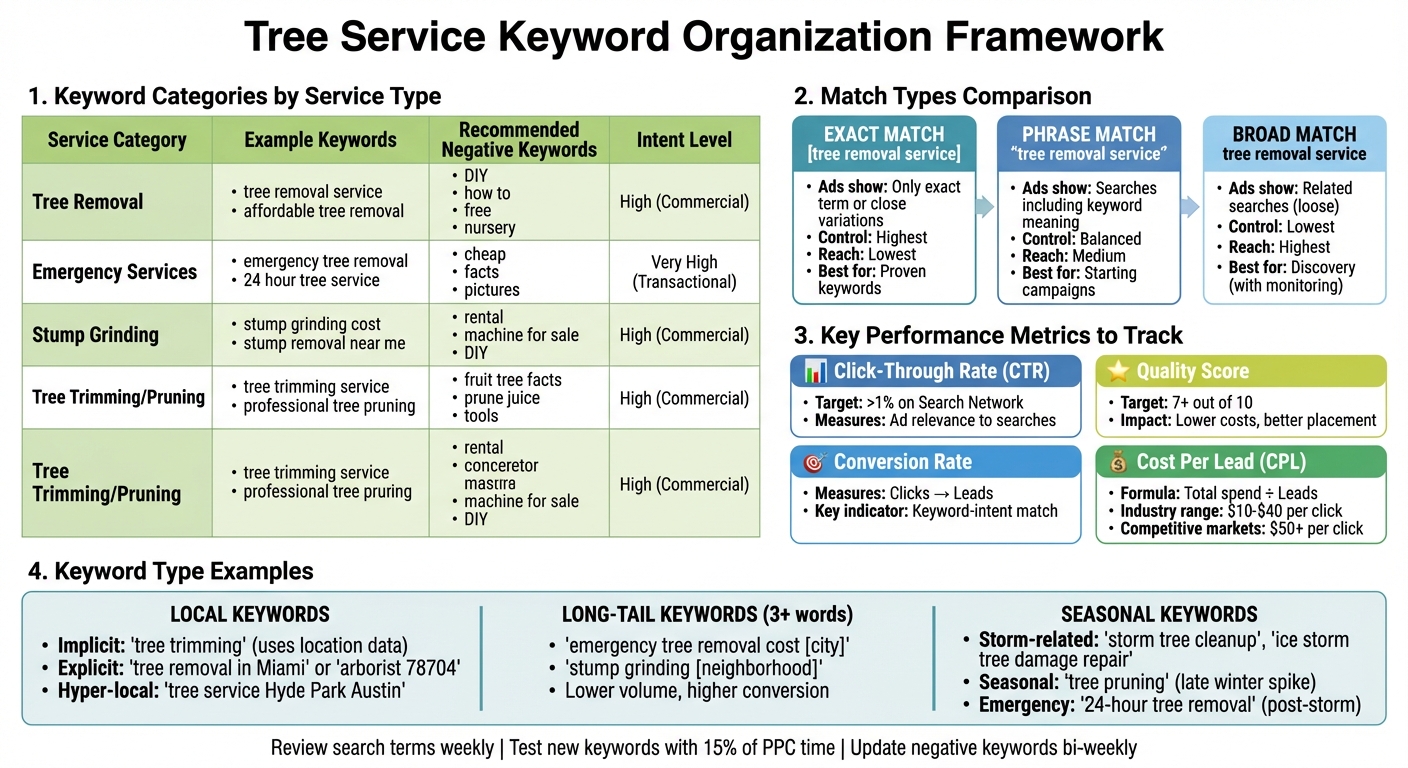
Tree Service Keyword Categories and Performance Metrics Guide
Now that you’ve identified your target keywords, it’s time to organize them in a way that ensures your ads align perfectly with search queries. This approach not only improves your Quality Score but also minimizes wasted ad spend. As Google Ads Help explains:
"If all your keywords and ads are in one ad group, users searching for ‘formal shoes’ may be shown your ad about ‘running shoes’. Instead, you can create ad groups for each keyword to show users either ‘formal shoes’ or ‘running shoes’."
Group Keywords by Service Type
Start by creating distinct ad groups for each service you offer, such as Tree Removal, Tree Pruning, Stump Grinding, and Emergency Services. This ensures that someone searching for "stump grinding cost" won’t end up seeing an ad about tree trimming. Pair each ad group with a dedicated landing page to increase conversions.
To refine your keywords further, add modifiers like "hire", "best", "service", or "company" to your base terms. For example, instead of just "tree removal", use phrases like "hire tree removal company" or "best tree removal service." These additions indicate that the searcher is ready to take action, not just browsing.
Choose the Right Match Types
Once you’ve grouped your keywords, you’ll need to decide how broadly or narrowly your ads should reach potential customers. Google Ads offers three match types to help you control this:
- Exact match: Ads appear only when someone searches for your exact term or a close variation (formatted as
[tree removal service]). This gives you tight control but limits your reach. - Phrase match: Ads show for searches that include the meaning of your keyword (formatted as
"tree removal service"), offering a balance between control and reach. - Broad match: Ads display for searches that relate to your keyword, even loosely (no special formatting). While this reaches the widest audience, it requires careful monitoring.
For starters, stick with phrase or exact match to avoid wasting your budget on irrelevant clicks. Arnold, The Digital Marketing Professor, shares:
"With Phrase and Exact match keywords I keep very specific control over the queries that trigger my ads."
After identifying high-performing keywords, consider expanding to broader match types to capture more traffic. Assess performance after 100–200 clicks to make informed adjustments.
Create a Negative Keyword List
Negative keywords are your shield against irrelevant traffic. By excluding terms like "DIY", "how to", "free", "jobs", "training", "rental", "bonsai", and "tools", you can ensure your ads only reach people actively looking to hire a professional.
Sean MacDonald, Founder of Tree Leads On Demand, highlights the importance of this step:
"Negative keywords help filter out irrelevant traffic, saving ad spend for high-intent searches."
Review your Search Terms Report every two weeks to identify new negative keywords and refine your list. For example, if you’re not hiring, exclude employment-related terms like "careers", "hiring", and "salary" to avoid paying for clicks from job seekers.
| Service Category | Example Keywords | Recommended Negative Keywords |
|---|---|---|
| Tree Removal | tree removal service, affordable tree removal | DIY, how to, free, nursery |
| Emergency Services | emergency tree removal, 24 hour tree service | cheap, facts, pictures |
| Stump Grinding | stump grinding cost, stump removal near me | rental, machine for sale, DIY |
| Tree Trimming/Pruning | tree trimming service, professional tree pruning | fruit tree facts, prune juice, tools |
Track and Improve Keyword Performance
After organizing your keyword groups and implementing negative keyword strategies, the next step is to focus on ongoing optimization. Initial campaigns are just the beginning – regular monitoring and adjustments are critical to ensure your advertising dollars are well spent.
Review Search Term Reports
The search terms report is a goldmine of information, showing the exact phrases people type into Google that trigger your ads. While keywords are what you bid on, search terms reflect the actual user queries. Checking this report weekly can help you spot irrelevant phrases and add them as negative keywords right away.
To dig deeper, enable the "Keyword" column in the report. This lets you see which of your bid keywords matched specific search terms, helping you identify if broad match keywords are attracting low-quality traffic. Google Ads Help sums it up well:
"By adding irrelevant search terms as negative keywords, you can prevent your ad from showing to people who are looking for something you don’t sell."
Keep in mind that search term data for a specific day typically becomes available after 3 p.m. PT the following day. Use this information to fine-tune your campaigns and focus on metrics that reveal how well your ads are performing.
Monitor Key Performance Metrics
To evaluate the effectiveness of your keywords, track these four critical metrics:
- Click-Through Rate (CTR): This measures how often people click on your ad after seeing it. A CTR below 1% on the Search Network usually indicates issues with your keywords or ad targeting.
- Quality Score: Google rates your keywords from 1 to 10 based on expected CTR, ad relevance, and landing page experience. Aiming for a score of 7 or higher can reduce costs and improve ad placement.
- Conversion Rate: This shows the percentage of clicks that turn into leads, such as phone calls or form submissions. It’s a key indicator of whether your keywords match user intent.
- Cost Per Lead (CPL): This metric divides your total ad spend by the number of leads generated, helping you assess if your keyword bids are financially sustainable.
For industries like tree services, where customers often prefer calling over filling out forms, using call tracking software can help you attribute phone leads to specific keywords. With these insights, you can refine your strategy to focus on keywords that deliver the best results.
Test New Keywords
Reserve about 15% of your PPC management time for testing new keywords and experimenting with match types. As WordStream advises:
"Ideally, you’ll do a little bit of keyword research (adding new keywords, setting new negatives, or experimenting with new match types) every week. Over time, your account will get stronger and more relevant because of it."
Use your search terms report to identify high-performing queries that aren’t already in your keyword list. Add these as new exact or phrase match keywords to capture more targeted traffic. If your budget allows, test broad match modifiers to uncover emerging trends, but keep a close eye on your negative keyword list to filter out irrelevant traffic.
Let new keywords run for 2–3 weeks to gather enough data before making adjustments. Before adding any terms, use Google Keyword Planner’s "Review Forecasts" feature to estimate clicks, impressions, and costs. This ensures your new keywords align with your budget and campaign goals.
Conclusion
Keyword research for tree service businesses isn’t a one-and-done task – it requires consistent effort and fine-tuning. Regularly tracking your website’s performance and updating your keywords is key to staying relevant. Think about the specific challenges your customers face, like storm damage or tree diseases, and let those guide your approach.
To sharpen your strategy, leverage tools like Google Keyword Planner for search volume and cost insights, and check your search terms report to see which queries are triggering your ads. Prioritize local and high-intent keywords – phrases such as "emergency tree removal near me" or "licensed arborist" often indicate that someone is ready to hire, not just researching. With the average cost per click for tree service keywords ranging from $10 to $40 (and even exceeding $50 in larger cities), making each click count is essential.
Keep your campaigns organized by grouping keywords based on the services you offer. Use the right match types to control when your ads show up, and maintain a negative keyword list to block irrelevant searches. This helps avoid wasting money on clicks that don’t convert.
Regular monitoring is your best ally in separating successful campaigns from underperforming ones. Check your search term reports weekly, track metrics like Quality Score and Cost Per Lead, and experiment with new keywords. The tree service industry is competitive, and search trends evolve, so staying on top of your data ensures your advertising dollars deliver results. By following these practices, you’ll keep your keyword strategy adaptable and effective throughout your campaigns.
FAQs
What are some ways to lower costs when bidding on expensive tree service keywords?
To cut down expenses on high-cost tree service keywords, start by organizing your ad campaigns into tightly focused ad groups. Aim for 10–15 closely related keywords per group. For example, keep services like stump grinding and pruning in separate ad groups. This approach not only improves your Quality Score but also helps bring down your cost-per-click (CPC).
Another smart move is to target geo-specific, high-intent long-tail keywords. These keywords tend to have less competition and attract local customers who are ready to book your services, saving you from wasting money on irrelevant clicks.
What are the best tools to find local, high-intent keywords for tree services?
To pinpoint high-intent local keywords for tree services, use tools that offer insights into search volume, geographic targeting, and commercial intent. Here’s a breakdown of three effective options:
- Google Keyword Planner: Integrated into Google Ads, this tool is fantastic for uncovering keywords with strong commercial intent. By setting location filters (like a city or ZIP code), you can find specific terms such as “emergency tree service Los Angeles”. It also provides data on competition levels and suggested bid amounts, giving you a clear idea of a keyword’s potential value.
- KWFinder: A great choice for local keyword research, KWFinder delivers search volume data and location-specific variations. For instance, you can search for a term like “tree removal” and uncover related phrases such as “stump grinding [city]”. It also highlights keywords your competitors are ranking for, helping you zero in on profitable opportunities.
- Google Search Console: This tool lets you analyze your website’s performance by showing the exact search terms visitors used to find you. It can uncover long-tail keywords like “how much does tree trimming cost in Dallas” that already bring traffic to your site, enabling you to refine and expand your strategy.
By leveraging these tools together, you can create a robust list of location-specific, high-intent keywords to attract well-qualified leads for your tree service business.
How can I use negative keywords to improve my Google Ads for tree services?
To make the most out of negative keywords, start by digging into your Search Terms report. This report will help you spot irrelevant searches that are triggering your ads. Once identified, add those terms as negative keywords to stop your ads from appearing for unrelated searches. For instance, if your services don’t cover certain areas, you might exclude terms like “DIY tree care,” “tree nursery,” or “free.”
You can set negative keywords at either the campaign level or ad group level, depending on how specific you want the exclusions to be. Keep your negative keyword list up to date to avoid wasting money on clicks that don’t lead to conversions. This approach not only improves your click-through rate (CTR) but also ensures your budget is focused on bringing in high-quality traffic that’s more likely to turn into paying customers.