
Negative keywords are a simple but powerful tool to prevent wasted ad spend on irrelevant clicks. For tree service businesses, irrelevant searches like "tree service jobs" or "DIY tree trimming" can drain your Google Ads budget without bringing in paying customers. By adding negative keywords, you block your ads from showing up in these types of searches, saving money and improving campaign performance.
Key Takeaways:
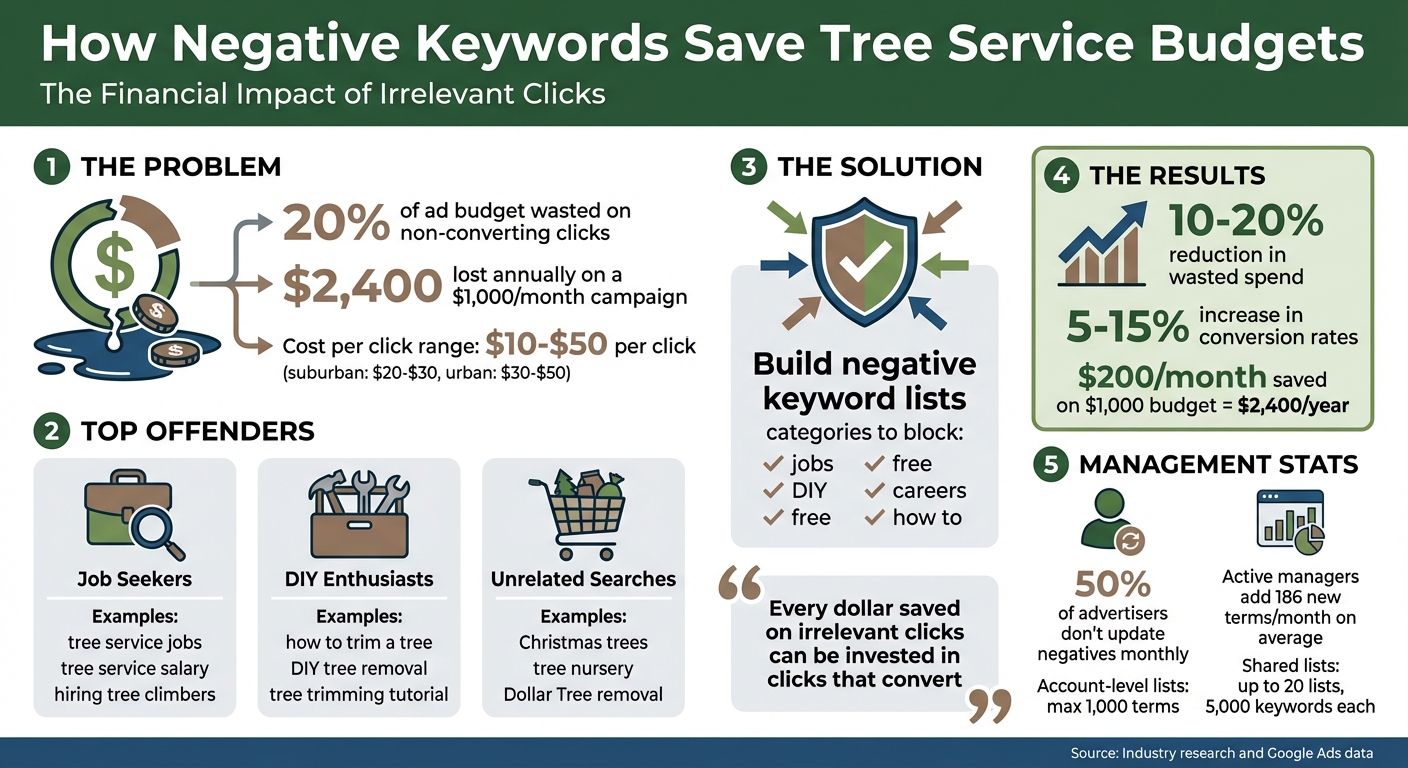
- Why It Matters: Advertisers lose about 20% of their budget on non-converting clicks. For a $1,000/month campaign, that’s $2,400 wasted annually.
- Top Offenders: Irrelevant searches include job seekers ("tree service jobs"), DIY enthusiasts ("how to trim a tree"), and unrelated terms ("Christmas trees").
- How to Fix It: Build a list of negative keywords like "jobs", "DIY", and "free" to filter out unqualified traffic.
- Results: Actively managing negative keywords can cut wasted spend by 10–20% and boost conversion rates by 5–15%.
By refining your negative keyword strategy, you can make every dollar count and focus on attracting high-intent customers actively seeking tree care services.
Negative Keywords ROI Impact for Tree Service Google Ads
Google Ads Negative Keywords: The RIGHT Way to Find and Add Negatives | Step-by-Step Tutorial

Why Tree Service Ads Waste Money
Tree service ads often end up appearing for searches that have nothing to do with professional tree care. For example, if you bid on "tree removal", Google’s algorithm might show your ad to people searching for things like "tree removal jobs" or even "Dollar Tree removal" (yes, the retail store!). Each of these clicks can cost anywhere from $10 to $50, but they rarely bring in potential customers. This problem becomes even worse when using broad match settings.
The Problem with Broad Match Keywords
Broad match keywords, which Google sets as the default, cast an overly wide net. While this approach might seem like it maximizes exposure, it often leads to clicks from people who aren’t looking for your services. For instance, if you use broad match for "tree service", your ad could show up for searches like "tree service careers", "how to build a treehouse", or "Christmas tree delivery service." None of these searches indicate someone looking to hire a professional for tree care.
To make matters worse, tree service keywords are among the most expensive in local advertising. In suburban areas, you’re looking at $20 to $30 per click, while in competitive urban markets, that figure can jump to $30 to $50 or more. Even a handful of irrelevant clicks can quickly drain your budget.
"Keywords are assumptions. Search queries are actions."
– Allen Finn, Co-founder, Toasted Collective
This mismatch between keywords and search intent leads to specific, costly examples of wasted ad spend.
Common Examples of Wasted Ad Spend
If you want to protect your ad budget, filtering out irrelevant searches is a must. One major issue is ads being shown to job seekers instead of potential customers. Searches like "tree removal jobs", "tree service salary", and "hiring tree climbers" might include your target keywords, but these users are looking for employment – not tree care services.
DIY enthusiasts are another group that eats into your budget. People searching for "how to trim a tree yourself" or "DIY tree removal" have already decided they don’t need a professional. Then there are completely unrelated searches, such as "tree nursery", "tree climbing gear", "artificial Christmas trees", or "tree identification guide", which can also trigger your ads. Each irrelevant click takes money away from those high-intent leads you really want to attract.
Andrew Buccellato, Owner of Good Fellas Digital Marketing, sums it up:
"Every irrelevant click chips away at your budget, lowers your Quality Score, and distracts you from reaching the customers who are actually ready to buy."
And here’s the kicker: when your Quality Score drops, your cost per click goes up, creating a vicious cycle that makes your entire campaign even more expensive.
How to Create a Negative Keyword List
Want to cut down on wasted clicks and make the most of your ad budget? A well-organized negative keyword list is your secret weapon. Start building your list before launching your campaign and keep refining it over time. Research shows that while 50% of advertisers don’t update their negatives monthly, those who do add an average of 186 new terms each month. Here’s how you can find and organize these keywords to boost your campaign’s efficiency.
Finding Irrelevant Search Terms
The first step is identifying the types of searches that drain your budget without delivering results. Focus on three main categories: employment-related terms, DIY searches, and unrelated products. Here’s how you can filter out these irrelevant clicks:
- Employment-related terms: Block words like "jobs", "careers", "hiring", "salary", "certification", and "resume" to avoid traffic from job seekers.
- DIY searches: Add terms such as "how to", "DIY", "tools", "rental", "diagram", "tutorial", and "free" to weed out users looking for do-it-yourself solutions.
- Unrelated products: Exclude terms like "tree house", "Christmas trees", "nursery", "tree climbing", or "indoor plants" if they don’t match your services.
If your business operates in a specific location, consider blocking nearby city names to avoid out-of-area clicks.
"By using n-gram analysis, you can identify and block a single word that makes multiple search terms irrelevant. This approach helps pinpoint effective one-word negative keywords and saves you time."
– Chris Cabaniss, Co-founder, Falcon Digital Marketing
Using Google Keyword Planner for Research
Google Keyword Planner is a great tool for uncovering irrelevant terms you might not think of on your own. Use the "Search for new keywords" feature by entering your core services, like "tree removal" or "tree trimming." Review the results to spot off-target phrases, such as "tree removal permit" or "tree removal cost calculator", which indicate research-based queries rather than transactional intent.
You can also use the "Landing Page" tool by entering the URL of a DIY site or another service provider. This can reveal unexpected keywords that don’t align with your business, which you can then add to your negative list. Don’t forget to use the "Negative Keywords" filter to exclude terms like "free" or "cheap" during your research. Once your research is complete, it’s time to organize your findings.
Organizing Keywords by Campaign and Ad Group
Google Ads allows you to apply negative keywords at the account, campaign, and ad group levels, giving you flexibility in how you manage them:
- Account-level negatives: These apply across all campaigns and are perfect for universal terms that are unlikely to lead to conversions. Keep in mind, account-level lists are capped at 1,000 terms.
- Shared Negative Keyword Lists: For more detailed control, use Shared Negative Keyword Lists within your Shared Library. You can create up to 20 lists per account, with each list holding up to 5,000 keywords. Be specific when naming these lists – for example, "Tree Service – Job Seekers" or "Tree Service – DIY Terms." Updates to these lists automatically apply to all linked campaigns.
- Ad group negatives: Use these to prevent internal competition between ad groups. For instance, if you have separate "tree removal" and "tree trimming" ad groups, add "removal" as a negative in the trimming group to ensure the right ad is triggered for each query.
sbb-itb-130a704
Improving Your Negative Keyword Strategy
Building an initial negative keyword list is just the beginning. To truly maximize your return on investment (ROI), you need to continuously refine and monitor your list. Search trends evolve, and so should your approach. Here’s how regular reviews, strategic match type usage, and focused tracking can take your negative keyword strategy to the next level.
Reviewing Search Term Reports
Search term reports are your window into the exact queries people type before clicking on your ads. These reports reveal user intent, often highlighting a gap between what you think your audience is searching for and what they’re actually typing. This gap is where wasted ad spend often hides.
For high-spending accounts, reviewing these reports weekly is ideal. Smaller budgets can manage with reviews every two weeks. Look for patterns that signal wasted spend, such as search terms with high impressions but low click-through rates (CTR), or queries that generate clicks but fail to convert. For example, job seekers might search for "tree service jobs", or DIY enthusiasts might type "how to trim a tree." These are prime candidates for your negative keyword list.
To streamline this process, filter your report by spend or cost per acquisition (CPA). This helps you quickly pinpoint underperforming queries. Keep in mind that negative keywords don’t automatically account for close variants like singular and plural forms, so you’ll need to add both manually.
Combining Match Types with Negative Keywords
Using different match types with your negative keywords gives you greater control over which searches your ads block. Each match type serves a unique purpose:
- Broad match negatives are ideal for excluding general categories, such as "free", "jobs", or "DIY."
- Phrase match negatives block searches where the word order is critical. For instance, excluding "free tree" will block "free tree trimming" but still allow "tree trimming for free."
- Exact match negatives target specific queries with pinpoint accuracy, ensuring that only the exact phrase is blocked.
Here’s a quick breakdown of how these match types work:
| Match Type | How It Works | Tree Service Example |
|---|---|---|
| Broad Match | Blocks ads if the search contains all terms in any order | tree removal blocks "removal of oak tree" and "tree stump removal" |
| Phrase Match | Blocks ads when the exact phrase appears in order | "free tree" blocks "free tree trimming" but allows "tree trimming for free" |
| Exact Match | Blocks ads only if the search query exactly matches the negative term | [tree service jobs] blocks only that specific query |
Start with broad match negatives to exclude general, irrelevant categories. Then, refine your exclusions with phrase and exact match types to avoid accidentally blocking valuable searches. To save time, consider creating shared negative keyword lists in your Shared Library. These lists can be applied across all your campaigns instantly.
Tracking the Results of Negative Keywords
Once you’ve reviewed and adjusted your negative keywords, tracking their impact is essential. Key metrics to monitor include click-through rate (CTR), Quality Score, conversion rate, and cost per lead. Removing irrelevant impressions naturally improves CTR, as your ads are shown to a more relevant audience. This relevance often leads to higher Quality Scores, which in turn can lower your cost per click (CPC).
Tracking conversion rates before and after implementing negative keywords can reveal just how much you’re saving. Studies suggest that active negative keyword management can reduce wasted spend by 10–20% and increase conversion rates by 5–15%. For example, a tree service business spending $1,000 per month could save around $200 monthly – or $2,400 annually. That’s money you can reinvest into clicks that are more likely to convert.
"Every dollar you save on an irrelevant click is another dollar you can invest in a click that converts."
– Keywordme
Regularly review your cost per acquisition to identify terms that generate leads but are far more expensive than your target CPA. Integrating data from your CRM with your Google Ads account can also help you pinpoint search terms that bring in leads without generating revenue. This allows for even finer adjustments to your negative keyword strategy.
For tree service businesses aiming to make the most of their ad spend, partnering with Tree Company Leads can provide the expertise you need. Their tailored Google Ads and lead generation strategies are designed to help you grow efficiently.
Conclusion
Negative keywords are a must-have for safeguarding your tree service advertising budget. On average, advertisers waste about 20% of their Google Ads budget on clicks that fail to convert. A well-planned negative keyword strategy can cut that waste by 20–40%.
By excluding irrelevant searches like "tree service jobs", "DIY tree care", or "tree nursery", you ensure your ad spend focuses on potential customers actively seeking tree care services. Start by creating a proactive list of universal negative terms – words like "free", "jobs", "careers", and "DIY" that are unlikely to align with your business. Then, fine-tune your approach with the right match types: use broad match for general exclusions, phrase match when word order matters, and exact match for pinpoint precision.
The benefits go beyond just saving money. Eliminating irrelevant impressions improves your click-through rate (CTR), boosts your Quality Score, and lowers your cost-per-click (CPC). Actively managing negative keywords can also increase conversion rates by 5–15%. For example, a $1,000/month campaign could save around $200 monthly – or $2,400 annually – by reducing wasted spend. That’s money you can redirect toward high-intent keywords that attract paying customers.
These savings not only protect your budget but also set the stage for more efficient ad management.
"Running a Google Ads campaign without a solid negative keyword list is like trying to fill a bucket with a giant hole in the bottom." – Rob Andolina, Founder/CEO, Keywordme
Tree Company Leads specializes in helping tree service businesses get the most from their advertising budgets. Through expert Google Ads management and tailored negative keyword strategies, they focus on connecting you with high-intent customers while maximizing your ROI.
FAQs
How can negative keywords help save money on Google Ads for my tree service business?
Negative keywords play a crucial role in optimizing your Google Ads campaigns by ensuring your ads don’t appear in irrelevant searches. For a tree service business, this means you won’t waste money on clicks from people who aren’t actually searching for tree care services. In turn, this helps you save money and improve your return on investment (ROI).
By narrowing your ad focus to more qualified traffic, negative keywords help your ads connect with users who are actively searching for services like tree removal or trimming. This targeted strategy allows you to make the most of your ad budget, ensuring every dollar works harder to attract potential customers.
What are some negative keywords tree service businesses should use?
Negative keywords play a crucial role for tree service businesses in managing their ad spend effectively. By excluding irrelevant searches, these keywords ensure your ads are shown to the right audience. Examples include "tree nursery", "DIY tree care", "free", "jobs", "cheap", "repair," and "tutorial." These terms help weed out job seekers, DIY hobbyists, or those searching for low-cost or free options, so your ads focus on reaching customers who are ready to hire professional tree care services.
How often should I review and update my negative keywords?
To get the most out of your ad campaigns and avoid unnecessary spending, make it a habit to review and update your negative keyword list regularly. Aim to do this at least once a month or whenever you evaluate a campaign’s performance. This practice allows you to spot irrelevant search terms that might be driving unqualified traffic. By refining your list, you can ensure your budget is directed toward attracting more qualified leads. Staying on top of this process not only boosts your ROI but also helps your ads connect with the right audience.