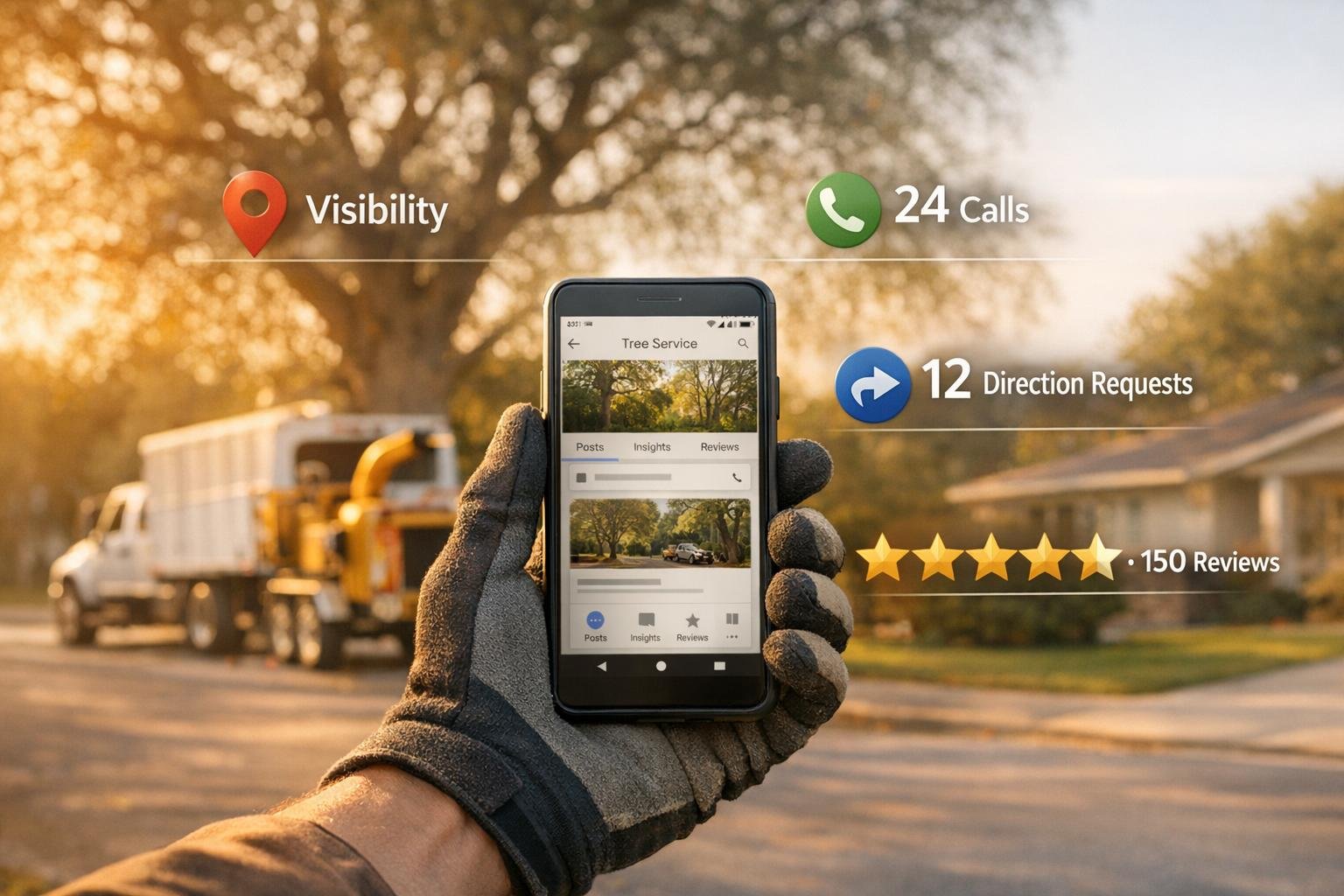
Your Google Business Profile (GBP) is a key tool for tree service businesses to attract and convert local customers. By optimizing your GBP, you can rank higher on Google, track customer actions, and build trust through reviews. Here’s what matters most:
- Visibility metrics: Track how often your profile appears in searches, the search terms used, and where customers are located.
- Customer actions: Monitor phone calls, website clicks, and direction requests to understand how people engage with your business.
- Reviews: Analyze star ratings, review volume, and customer feedback to maintain a strong reputation and improve rankings.
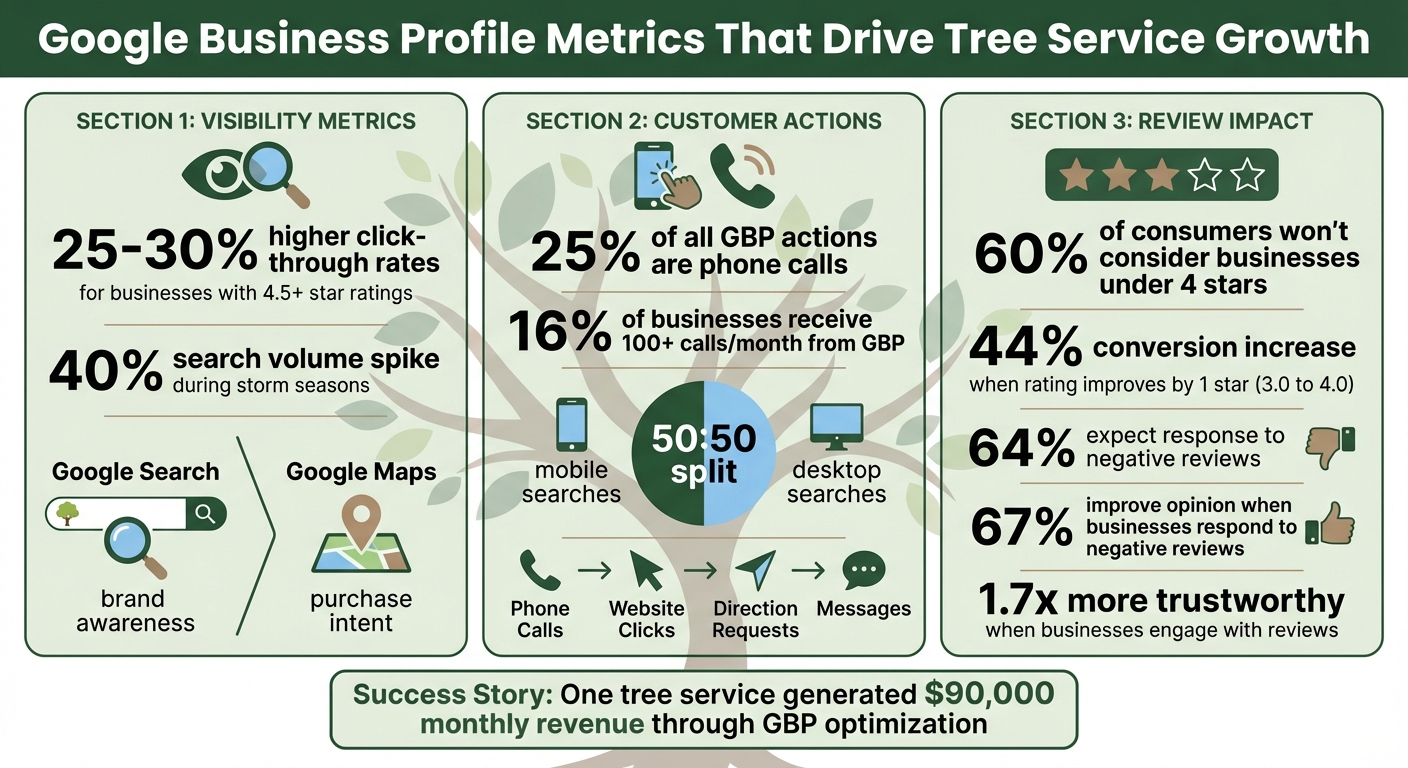
Success stories show how businesses have increased leads and revenue by fine-tuning their GBP. For example, targeted updates led one tree service provider to generate $90,000 in monthly revenue. Regularly reviewing these metrics and responding to customer feedback can directly impact your bookings and revenue.
Start by checking your GBP performance dashboard, using UTM tags for better tracking, and responding to reviews promptly. Staying consistent with these practices ensures your tree service stands out in your local market.
Google Business Profile Key Metrics and Impact Statistics for Tree Services
Visibility Metrics: Measuring Your Online Presence
Impressions and Profile Views
Views and impressions are key indicators of how often your business profile pops up in Google Search or Google Maps results. Google tracks unique visitors once per day, no matter the device or platform.
When it comes to Google Search, it’s a great tool for gauging overall brand awareness. For example, someone searching for "best tree pruning service" is likely exploring options. On the other hand, Google Maps tends to reflect stronger purchase intent – customers searching for directions are often ready to act immediately. Mobile users, in particular, show higher urgency and are more likely to convert, especially for time-sensitive services like emergency tree work. These metrics also reveal where customers are searching from, allowing you to pinpoint strong service areas or identify neighborhoods where your presence could improve.
"Maps traffic often indicates higher purchase intent – customers actively seeking directions typically need immediate service." – Robben Media
Performance data is updated every 1-2 days, though some metrics, like photo views, may take longer to refresh. Businesses with a 4.5+ star rating and consistent, fresh reviews often see 25-30% higher click-through rates compared to competitors with lower ratings.
From here, dive into search queries and seasonal trends to uncover more about your online reach.
Search Queries and Seasonal Trends
Your Google Business Profile (GBP) dashboard provides a "Searches" breakdown, showing exactly what terms people use to find you – things like "emergency tree removal" or "stump grinding near me." This serves as a handy form of keyword research. You’ll also see whether customers find you through Direct searches (your business name) or Discovery searches (categories or services). If most traffic comes from Discovery searches, it’s a sign to focus on Local SEO vs Paid Ads to determine the best strategy for your business.
Tree services often experience predictable demand spikes. For instance, search volume can jump by 40% during storm seasons or after extreme weather events. Lean into these patterns. Wesley Smith, Owner of Tree Service Digital, suggests:
"You can also benefit from free advertising by posting promotional offers and special events via Google Posts, perhaps highlighting different tree services as the seasons change".
Consider creating posts tailored to seasonal needs, like "Storm Prep" in the spring or "Winter Pruning" as colder months approach.
Google also uses bolded text, called "justifications", to highlight specific terms in your listing, such as "Provides: Tree pruning." These justifications can significantly boost click-through rates. To maximize their impact, review your search queries monthly and incorporate high-volume terms into your Services section and business description. Place these keywords in the first 250 characters of your description to ensure they’re visible before the text is truncated.
Comparing Your Performance to Local Competitors
Once you’ve analyzed your metrics, compare them with local competitors to uncover opportunities. Google’s Insights section includes benchmarking data, which lets you see how your photo engagement and views stack up against "similar businesses" in your area and category. This helps you gauge whether your visual content is as effective as other local tree services. Additionally, you can manually check how your profile appears in the Local 3-Pack – the top three businesses displayed with a map – across various devices and locations.
Pay close attention to rankings in different service areas to spot zones where competitors might be outperforming you. Study competitor profiles for highlighted keywords and review attributes to better understand what local customers prioritize.
"The difference between thriving and surviving often comes down to which businesses track what matters and optimize accordingly." – Robben Media
To dig deeper, use UTM codes on your GBP links to pinpoint which profile features are driving traffic compared to competitors’ broader organic presence. Regularly update your profile images to reflect each specific service you offer. Google may display a service photo over your cover photo if it aligns more closely with a user’s search query.
sbb-itb-130a704
Customer Action Metrics: Tracking Engagement
Phone Calls and Website Clicks
Your Google Business Profile (GBP) captures two key engagement actions: phone calls and website clicks. These metrics provide valuable insight into how customers prefer to connect with your business.
Google tracks click-to-call actions when mobile users tap the phone button on your profile. However, it doesn’t account for desktop users who manually dial your number after viewing it. Since mobile and desktop searches are roughly split 50:50, the actual number of calls you receive could be higher than reported. Phone calls are a major driver of engagement – about 25% of all GBP actions come from calls, making them an essential tool for turning searches into customers.
"A quarter of actions taken on GBP listings are phone calls." – Frances Miller, CallTrackingMetrics
Website clicks are tracked when users tap the "Website" button on your profile. However, without custom tracking, this traffic often appears as "direct" or "organic" in Google Analytics. To fix this, add a UTM tag to your website URL in the GBP dashboard (e.g., yourwebsite.com/?utm_source=google&utm_medium=organic&utm_campaign=gbp).
For tracking calls effectively, use a dedicated call tracking number as your primary contact and list your main business number under "Additional phone." This setup allows you to capture desktop calls, call durations, and even recordings – features Google removed from its native interface in July 2024. Interestingly, about 16% of businesses receive over 100 calls per month directly from their GBP listing. After phone and website clicks, direction requests offer another layer of insight into customer behavior.
Direction Requests and Customer Inquiries
Direction requests provide a window into where your customers are coming from and often signal strong purchase intent. These requests are particularly useful for identifying customers seeking same-day or next-day services, which can be critical in emergency situations.
This data highlights areas with high demand and potential growth opportunities. Similarly, customer inquiries via messages reveal common questions and specific service needs. For example, if you frequently get questions about stump grinding, consider adding more details about this service directly to your profile.
Google’s "Get Competitive Quotes" feature has shifted how homeowners reach out, allowing them to contact up to four tree service providers simultaneously. While this feature has impacted lead quality, as Panajota Gushkova, Paid Search Lead at Tree Care Marketing Solutions, notes:
"The competitive quotes feature changes the game for LSA lead quality. We’re seeing these leads behave more like cold inquiries than the warm leads traditional LSAs generate."
Responding quickly – ideally within 5–15 minutes – can make all the difference, as the fastest responder often wins the job. Since tree service pricing typically requires an on-site assessment, treat these inquiries as an opportunity to schedule free estimates promptly. Use the insights from inquiries to fine-tune your service offerings and strategy.
Using Engagement Data to Improve Your Services
By analyzing data from calls, clicks, and inquiries, you can adjust your operations to align with customer behavior. Review engagement metrics regularly to spot trends and refine your approach. For instance, check the peak calling times in the GBP Performance tab – if most calls happen in the early morning, ensure your team is ready to handle them during those hours.
Dive into search query data to see which services are most popular, and update your website content and GBP "Services" section accordingly. This ensures you’re highlighting the services that resonate most with your audience.
Compare the performance of different engagement actions to see which channels lead to better conversions. If one channel consistently outperforms others, focus your efforts there – whether it’s optimizing for mobile users or improving your website’s estimate request process.
| Metric Type | Measures | Action |
|---|---|---|
| Call Clicks | Taps on the "Call" button | Pair with call tracking to measure lead quality and conversion rates |
| Website Clicks | Clicks to your website | Use UTM tags to track which services drive site conversions |
| Direction Requests | Requests for directions | Identify high-demand neighborhoods for focused crew deployment |
| Messages | Direct inquiries via Search/Maps | Monitor response speed to improve lead capture |
To separate organic GBP performance from paid advertising, use different tracking numbers for Google Ads Location Extensions. This avoids inflated metrics and helps pinpoint which channel generates profitable leads. Keep in mind, GBP metrics typically capture only 30% to 50% of the actual calls your business receives. Combining Google’s data with third-party tools will give you a more complete picture.
Review Metrics and Reputation Management
Review Volume and Average Rating
The number of reviews your business has and your average star rating play a huge role in building trust with potential customers and improving your local search rankings. For tree service businesses, Google factors in "prominence" when ranking local companies, which is influenced by both review quantity and quality. Here’s a telling statistic: 60% of consumers won’t even consider a business unless it has at least a 4-star rating, and 28% lose trust if a business has far fewer reviews than its competitors.
Both the volume of reviews and your average rating matter. If you only have a handful of reviews, a single bad one can drag your score down significantly. But with more positive reviews, the impact of one negative comment is minimized, giving a clearer picture of your service quality.
Here’s why improving your rating is worth the effort: Boosting your average rating by just one star – say, from 3.0 to 4.0 – can increase conversions on your Google Business Profile by 44%. And keep in mind, most people (around 70%) read between 5 and 20 reviews before deciding whether to trust a business. Interestingly, a mix of both positive and negative reviews tends to feel more credible to potential customers.
"More reviews and positive ratings can help your business’s local ranking."
- Google Business Profile Help
When customers leave reviews, Google often prompts them to specify the type of service they received, like tree removal or pruning. This extra detail not only helps potential customers understand what you’re great at but also allows you to track satisfaction across different services. Just note that it can take up to two weeks for a new review to affect your overall rating.
Understanding how many reviews you have and their quality sets the foundation for analyzing their timing and sentiment.
Review Timing and Customer Sentiment
Fresh reviews carry more weight than older ones. A steady flow of recent feedback signals to Google – and potential customers – that your business is active and consistently delivering good results. Beyond just numbers, the tone of customer sentiment can reveal trends you might otherwise miss. For instance, if stump grinding reviews are consistently glowing, but emergency tree removal feedback is more mixed, you’ve identified both a strength and an area for improvement. Negative reviews, while tough to read, often highlight where customer expectations aren’t being met and give you a roadmap for better service.
Pay attention to the details customers mention – things like how professional your crew was, how quickly you responded, or how thorough the cleanup was. These specifics can highlight what’s working and what needs attention. For example, if several reviews in a single month mention delays, it might point to a scheduling issue you need to address.
"Negative reviews aren’t necessarily a sign of poor business practices. Customer feedback presents opportunities to learn what they expect and may help you find ways to improve future experiences."
- Google Help
The insights you gain from reviews should shape how you respond, which we’ll dive into next.
Using Review Feedback to Improve Your Business
Responding to reviews isn’t optional – it’s essential. 64% of customers expect a response to negative reviews, and 40% expect one for positive feedback. The upside? When businesses respond thoughtfully to negative reviews, 67% of customers improve their opinion of the brand, and 62% of unhappy customers are willing to give the business another shot. Plus, businesses that engage with reviews are seen as 1.7 times more trustworthy by potential clients.
Aim to respond within 24–72 hours, and make your replies personal and professional. Address the reviewer by name and sign off with your own name or initials to add a human touch. For positive reviews, thank the customer specifically and mention the service they received (e.g., "We’re so glad we could assist with your oak tree removal!"). For negative feedback, start with an apology, provide a brief explanation, and offer a way to resolve the issue privately.
"When you reply to customer reviews, it shows that you value their feedback. Positive reviews and helpful replies can help your business stand out."
- Google Help
Use negative reviews as learning opportunities. For instance, if 65% of complaints mention rude customer service, it might signal a need for better staff training. If comments frequently mention issues with cleanup, it could be time to revisit your post-job protocols. On the flip side, highlight and reinforce practices that earn praise in positive reviews. Using feedback effectively not only enhances your Google Business Profile but also attracts higher-quality leads.
Tools and Methods for Tracking GBP Metrics
Connecting Google Analytics with GBP
Your Google Business Profile (GBP) dashboard gives you insights into listing actions, but it doesn’t capture what happens once visitors land on your website. That’s where Google Analytics steps in. By using UTM parameters on your website URL in your GBP dashboard, you can track on-site behavior like contact form submissions, views of specific service pages, or even exits.
To get started, use Google’s Campaign URL Builder to create a tagged link. Include parameters like utm_source=google, utm_medium=organic, and utm_campaign=gbp. Once you’ve updated the "Primary website" field in your GBP with this UTM-tagged URL, you can track traffic in Google Analytics by navigating to Acquisition > All Traffic > Source/Medium. This method helps you pinpoint which actions on your site are coming directly from your GBP.
"Without UTM tagging, traffic from GBP will show in Google Analytics as either organic or direct. Even when it does get attributed to the organic channel, we have no idea which part of the Google Business Profile that visitor came from."
- Claire Carlile, Google Business Profile Silver Product Expert
For even deeper insights, consider using specialized lead generation tools.
Local SEO Tools for GBP Analysis
Although the built-in Performance dashboard in GBP provides a basic overview, specialized tools can offer more detailed insights and streamline management, especially for businesses with multiple locations:
- AgencyAnalytics: Combines data from GBP, Google Analytics, and call tracking into a single, comprehensive view.
- BrightLocal: Features tools like the "Local Search Grid", which shows your rankings across a geographic area and includes SERP screenshots.
- Birdeye: Uses AI-driven tools like Insights AI for sentiment analysis and Competitors AI for benchmarking against others in your industry.
Additionally, Google Search Console can help you identify non-branded keywords that contribute to your Local Pack rankings. Since Google removed detailed call history in July 2024, external call-tracking software is now essential for evaluating lead quality and tracking call duration.
"Google Business Profile will track the number of calls to your business from your profile. However, we find it valuable to also use a call tracking tool with a customized number to better identify qualified leads."
- Valerie Jennings, CEO, Jennings Social Media & MarTech
With these tools, you can analyze your GBP performance more effectively and identify areas for improvement.
Setting Up a Regular Metric Review Schedule
Once you’ve integrated analytics and specialized tools, it’s crucial to establish a routine for reviewing your GBP performance. Decide who will monitor your profile – whether it’s you, a team member, or a marketing partner. While customer reviews and messages often need daily attention, broader performance metrics can typically be reviewed monthly, or more frequently in highly competitive markets.
Enable notifications to stay on top of new reviews and messages. Create a monthly checklist that covers key metrics like search queries, website clicks, direction requests, photo engagement, and service interactions. Keep in mind that Google only retains six months of historical data, so exporting your data regularly is essential for tracking long-term trends. If you manage multiple locations, automated reporting tools can simplify this process.
"As local marketers, we need to be monitoring our Google Business Profiles so that we can check the progress or quality over a period of time. We also need to make sure we have a process for systematic review and optimization so that we can see what’s working and what isn’t."
- Claire Carlile, Google Business Profile Silver Product Expert
Conclusion
How GBP Metrics Support Business Growth
Your Google Business Profile (GBP) works around the clock to generate leads, offering insights into how customers discover you, interact with your business, and perceive your reputation in the local market. Every month, millions of people search for local services, and for tree service companies, this means a wealth of high-intent customers looking for emergency removals, routine trimming, or stump grinding.
Tracking the right metrics can directly influence your revenue. Businesses maintaining a 4.5+ star rating with consistent, positive reviews often see a direct boost in bookings. Metrics like direction requests and call clicks indicate customers ready to take action, while search query data provides valuable insight into the exact terms people use when searching for tree services. As Robert Messinger, Director of SEO at Dentalfone, explains:
"Next to a business’s website, the GMB profile is the next most valuable piece of digital real estate".
Next Steps for Tracking Your Metrics
Now that you understand how GBP metrics fuel growth, it’s time to take action. These metrics not only reflect your current performance but also highlight opportunities for improvement and expansion.
Start by accessing the Performance tab in your GBP manager to review the last six months of data. This will give you a baseline for searches, customer actions, and review trends. Add a UTM-tagged URL (e.g., utm_source=gbp&utm_medium=organic) to your website field to track visitor behavior in Google Analytics 4, helping you gain deeper insights into customer engagement.
Establish a monthly review routine to keep your profile fresh and relevant. Update photos with recent project images, respond to all customer reviews, and analyze which search queries are driving the most visibility. Since Google discontinued detailed call history in July 2024, consider using a dedicated tracking phone number to measure lead quality and call durations more effectively. If you’re managing multiple service areas or need help fine-tuning your local SEO strategy, working with specialists like Tree Company Leads can provide tailored marketing and lead generation solutions for tree service businesses.
Use this data to make informed decisions – adjust staffing, refine your services, and maximize your marketing ROI.
The Best Metrics to Use for Google My Business
While organic metrics are vital, many businesses also use Google Ads for tree services to capture immediate local demand.
FAQs
How can Google Business Profile metrics help me grow my tree service business?
Google Business Profile metrics offer crucial insights that can help expand your tree service business. By keeping an eye on data like profile views, searches, clicks, and customer actions (such as calls, direction requests, or messages), you can uncover trends in customer behavior and engagement. These patterns can guide you in refining your profile content and zeroing in on keywords that deliver the best results.
On top of that, tracking reviews and ratings gives you a window into customer satisfaction levels while also helping to establish trust with potential clients. When used wisely, these metrics can boost your online presence and bring in more tree service bookings.
What key Google Business Profile metrics should tree service companies track?
Tree service businesses aiming to boost their online presence should pay close attention to key metrics from their Google Business Profile. These metrics reveal how well your business connects with potential customers and can guide your marketing efforts. Here are some of the most important metrics to monitor:
- Search appearances: This shows how often your business shows up in local search results, giving you a sense of your visibility.
- Customer actions: Track actions like calls, requests for directions, website clicks, or messages initiated through your profile to gauge engagement.
- Profile views and clicks: See how many people are viewing and interacting with your profile to assess its effectiveness.
- Customer reviews: Keep an eye on both the number and quality of reviews to manage and improve your reputation.
By analyzing these metrics, you can better understand how customers find and interact with your business, allowing you to fine-tune your strategies and strengthen your online presence.
How do customer reviews affect my tree service business’s local search rankings?
Customer reviews are an essential part of boosting your tree service business’s local search rankings. Google takes several factors into account, such as the quantity of reviews, their overall quality, and how recent they are. Good reviews don’t just improve your rankings – they also help build trust and confidence with potential clients.
To improve your local SEO, make it a habit to encourage happy customers to share their experiences, respond quickly to feedback (whether positive or negative), and ensure a steady stream of fresh reviews. These actions show Google that your business is active and dependable, which can positively impact your visibility.