
If you’re running Google Ads for tree services for your business, tracking ROI (Return on Investment) is essential to ensure every dollar spent brings measurable results. Without ROI tracking, you risk wasting money on ineffective campaigns. Here’s the key takeaway:
- ROI Basics: ROI measures revenue generated compared to ad spend. For tree services, job types like emergency tree removal ($2,000–$5,000 per job) and routine trimming ($200–$800) vary in profitability.
- Key Metrics: Monitor Cost Per Click (CPC), Click-Through Rate (CTR), Conversion Rate, Cost Per Lead (CPL), and Customer Lifetime Value (CLV) to understand ad performance.
- Tools to Use: Google Ads conversion tracking, Google Analytics 4 (GA4), and call tracking software like CallRail or CallTrackingMetrics are essential for accurate data.
- ROI Calculation: Use formulas like ROI = (Revenue − Ad Spend) ÷ Ad Spend × 100 to measure performance and adjust campaigns.
- Optimization: Segment campaigns by job type, use negative keywords to reduce wasted spend, and improve landing pages for better conversions. (Ensure your site follows a tree service website checklist for maximum impact.)
With proper tracking and adjustments, tree service campaigns can deliver a 5–15x return on ad spend, maximizing revenue while minimizing waste. Let’s dive into the details.
How To Track ROI In Google Ads (Beginner Friendly)
sbb-itb-130a704
Key Metrics for Tracking ROI in Tree Service Ads
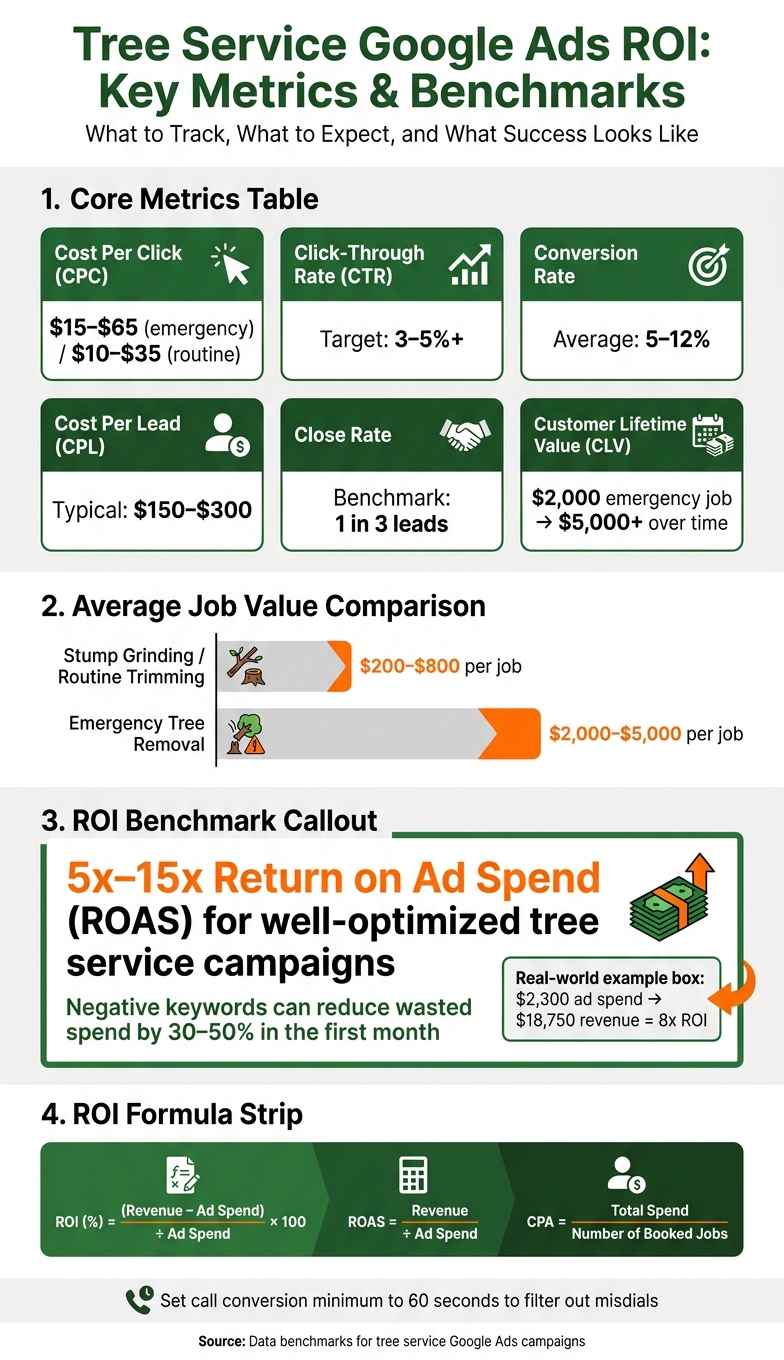
Tree Service Google Ads ROI: Key Metrics & Benchmarks
Core Metrics You Need to Measure ROI
If you’re running Google Ads for your tree service business, tracking the right metrics is essential to understanding your return on investment (ROI). Here’s a breakdown of the key numbers you should monitor:
| Metric | Measurement | Tree Service Benchmark |
|---|---|---|
| Cost Per Click (CPC) | The amount you pay each time someone clicks on your ad | $15–$65 for emergency keywords; $10–$35 for routine services |
| Click-Through Rate (CTR) | Percentage of people who click after seeing your ad | Below 3–5% may indicate weak ad copy or poor keyword targeting |
| Conversion Rate | Percentage of clicks that turn into leads | 5–12% is the average |
| Cost Per Lead (CPL) | Total ad spend divided by the number of leads generated | $150–$300 is a typical range for tree removal |
| Close Rate | The ratio of leads that turn into booked jobs | 1 in 3 leads is a common benchmark |
| Average Job Value | Revenue per completed job | $200–$800 for stump grinding; $2,000–$5,000 for emergency removal |
| Customer Lifetime Value (CLV) | Total revenue a customer generates over time | A $2,000 emergency job can grow to $5,000+ with follow-up services |
For tree services, a conversion usually means a phone call lasting over 60 seconds, a completed contact form, or a quote request. This filters out accidental calls and ensures you’re tracking genuine interest.
One often-overlooked metric is Customer Lifetime Value (CLV). For example, a homeowner who books an emergency removal for $2,000 this spring might return for stump grinding in the fall and annual pruning next year. That single customer could end up generating $5,000 or more in revenue over time.
Tools for Tracking These Metrics
To get accurate data, you’ll need the right tools working together. Start by setting up Google Ads conversion tracking, which captures form submissions and phone calls tied directly to your ad spend. But since 70–80% of tree service leads come through phone calls, you’ll also need specialized call tracking software.
Here are two popular options:
- CallRail: Starts at about $50/month and offers keyword-level attribution, call recordings, and CRM integrations.
- CallTrackingMetrics: Starts at around $65/month and provides similar features, helping you trace which search terms led to high-value jobs.
Google Analytics 4 (GA4) is another must-have tool. It tracks visitor behavior on your website – like which pages they view, how long they stay, and where they drop off. Pairing GA4 with industry-specific CRMs like Jobber or Arborgold lets you connect every step, from ad click to final invoice. This approach gives you a complete picture of ROI, not just lead volume. Understanding how this compares to local SEO vs paid ads can help you balance your long-term marketing strategy.
One important note: Google Ads defaults call conversion tracking to 0 seconds, which can inflate your numbers with accidental dials. Adjust this setting to 60 seconds to ensure you’re only counting real prospects.
If setting up these tools feels like a daunting task, professional assistance can make all the difference.
How Tree Company Leads Can Help
Getting the tools in place is just the first step. Proper setup is critical to ensure your data is accurate and actionable. Misconfigured tracking can lead to wasted time and unreliable results. That’s where Tree Company Leads comes in. They handle everything – from Google Ads conversion tracking to call tracking integration and campaign structuring. Their services are tailored specifically for tree service companies, ensuring the system is optimized for your unique needs, including job types, call patterns, and seasonal trends.
How to Calculate ROI for Tree Service Ads
ROI Formulas for Tree Service Campaigns
Once you’ve set up your tracking tools, calculating ROI becomes a straightforward process. Here are three essential formulas every tree service business owner should know:
- ROI (%) = (Revenue − Ad Spend) ÷ Ad Spend × 100
- Return on Ad Spend (ROAS) = Revenue ÷ Ad Spend
- Cost Per Acquisition (CPA) = Total Spend ÷ Number of Booked Jobs
Let’s break it down with an example. Imagine you spend $1,500 on ads in a month, secure 10 booked jobs at an average of $500 each, and generate $5,000 in revenue. Using these formulas:
- Your ROAS would be 3.3x ($5,000 ÷ $1,500).
- Your ROI would come out to 233%.
- Your CPA would be $150 per booked job – well within a profitable range for tree trimming services.
It’s also important to consider the Customer Lifetime Value (CLV) to understand the total revenue potential beyond just the first job.
Next, let’s look at how these calculations shift depending on the type of job and campaign strategy.
Calculating ROI by Job Type and Campaign
Tree service jobs vary widely in both cost and revenue potential, and this directly impacts your ROI. For instance, emergency tree removals often come with higher costs per click (CPC) – ranging from $40 to $65 in larger metro areas – but these jobs can bring in $2,000 to $5,000 or more, making them highly profitable. On the other hand, routine trimming jobs are less expensive to advertise but also yield lower revenue per booking.
This is why segmenting your campaigns based on job type is so important. Combining all services into one campaign can make it difficult to pinpoint which services are profitable and which are draining your budget. For example, one tree service business spent $2,300 on Google Ads in a month. The campaign generated 37 leads, 15 of which converted into booked jobs, resulting in $18,750 in revenue – an impressive 8x ROI.
By calculating ROI separately for each campaign or ad group, you can identify where your budget delivers the best returns. For instance, if your emergency removal campaign achieves a 10x ROAS but your stump grinding campaign only hits 2x, it’s clear where to allocate more resources.
Segmented ROI data gives you the clarity needed to fine-tune your budget and maximize returns.
Reading and Using Your ROI Results
Once you’ve calculated your ROI, the next step is interpreting the data to refine your campaigns. For tree services, a cost per lead (CPL) of $150–$200 is typically profitable when the average job value is around $1,200. However, if you’re paying $300 per lead for a service that only averages $400 per job, the campaign is losing money – even if it generates a high volume of leads.
Strong tree service campaigns often achieve a ROAS between 5x and 15x. If your campaign falls below 5x, it’s time to make adjustments, such as refining your keywords, improving your tree service web design, or tweaking your bidding strategy. On the flip side, if you’re hitting above 15x, consider increasing your budget to capture more leads before competitors take the opportunity.
Regularly monitoring your ROI helps you identify underperforming campaigns early and double down on the strategies that are driving results. This ensures every dollar of your ad spend is working as hard as it can.
Setting Up ROI Tracking for Google Ads
Setting Up Conversion Tracking in Google Ads
To measure ROI effectively, Google Ads needs to understand what actions matter most for your business. For tree service companies, the key conversion actions are phone calls, contact form submissions, and quote requests – the steps that lead directly to booked jobs.
Start by switching to Expert Mode in Google Ads. This mode enables detailed conversion tracking, which is essential for accurate ROI measurement. Smart Campaigns, while simpler, lack the precision needed for this level of tracking.
"Without conversion tracking, Google Ads becomes expensive guesswork. You might spend $5,000 monthly without knowing if it generated five leads or fifty." – Alex Gambashidze, Marketing Associate, ResultCalls
For phone call conversions, set a 60-second minimum call duration. This helps filter out misdials and hang-ups, ensuring your data represents real leads. Next, assign revenue values to each conversion type based on the average size of the jobs they generate. For instance, you might value emergency removals at $2,500 and trimming jobs at $600. These values allow Google to optimize its bidding system toward your most profitable conversions.
Connecting Google Ads with Other Tools
Integrating Google Ads with other tools is a simple but crucial step for deeper insights. Start by linking Google Ads to Google Analytics 4 (GA4). This connection lets you track post-click behavior, such as time spent on your site, form submissions, and page visits. Additionally, connect Google Search Console to see how your paid and organic search strategies complement each other.
Use UTM parameters to tag each ad URL. For example, a UTM tag might look like this: ?utm_source=google&utm_medium=cpc&utm_campaign=emergency-removal. These tags help you trace leads back to specific campaigns, so when a lead shows up in your CRM or spreadsheet, you’ll know exactly where it came from.
For more advanced tracking, consider using a third-party tool like CallRail ($50–$150 per month). CallRail offers keyword-level attribution, call recording, and CRM integration, which go beyond the capabilities of Google’s free forwarding numbers. If your business spends $1,500 or more on ads monthly, this tool can quickly pay for itself by providing better insights into call performance. With all these tools connected, you’ll have a solid foundation for tracking ROI.
Building a Basic ROI Tracking System
You don’t need fancy software to start tracking ROI – an organized spreadsheet works just fine. Log the following metrics for each campaign, updating them weekly or monthly:
| Metric | Formula |
|---|---|
| Cost Per Lead (CPL) | Total Spend ÷ Total Conversions |
| Return on Ad Spend (ROAS) | Total Revenue ÷ Total Ad Spend |
| ROI | (Revenue − Cost) ÷ Cost |
The critical step is tying ad data to actual job outcomes. For example, if your Google Ads dashboard reports 20 conversions but your CRM shows only 12 booked jobs, that discrepancy matters. Track both sets of data to calculate a more accurate cost per acquisition (CPA) and ROI.
As your data grows, you can take things further by importing offline conversions into Google Ads. This involves uploading actual job revenue linked to specific ad clicks using the Google Click ID (GCLID). Feeding this revenue data back into Google allows its algorithms to optimize bids more effectively. Once you’ve logged 30 or more conversions, consider switching to an automated Target CPA strategy to improve overall performance.
Improving Campaigns Using ROI Data
Fixing Campaigns That Are Not Performing
With an ROI tracking system in place, you can pinpoint which campaigns are delivering results and which are wasting money. One major issue is combining high-value and low-value services in the same campaign. This approach muddles ROI metrics, making it hard to see where your budget is going. To fix this, run separate campaigns for different service types to get a clearer picture of performance.
Check your Search Terms report weekly to eliminate irrelevant queries that eat up your budget. Adding negative keywords can block these searches and reduce wasted spend by 30% to 50% in the first month. If certain keywords consistently attract clicks but fail to convert, pause them. Redirect that budget to high-intent keywords like "emergency tree removal near me."
"The biggest budget killer? Paying for clicks that never become customers." – Alex Gambashidze, Marketing Associate, ResultCalls
A campaign is underperforming when its cost per lead (CPL) is higher than the profit margin of the jobs it generates. For instance, if your average tree removal job brings in $1,200, a CPL of $150–$200 is reasonable. But a CPL of $400 for a $300 trimming job clearly isn’t sustainable.
Adjustments That Can Raise ROI
If your ads are generating clicks but not converting into leads, the problem often lies with the landing page. Direct traffic to a service-specific, mobile-friendly page instead of a generic homepage. Incorporating trust signals – like certification badges, before-and-after photos, and a prominent "Get Free Quote" button – can significantly boost conversions.
Quick follow-ups are also crucial for emergency leads. Beyond that, think about how your service offerings impact revenue. Adding extras like stump grinding to a tree removal quote can increase the value of each lead without boosting ad spend. On the bidding front, raise bids on high-intent keywords like "emergency tree removal", which can lead to jobs worth $2,000–$5,000. At the same time, scale back on lower-margin terms like routine maintenance.
These immediate adjustments are just the start. Long-term tracking is essential for sustained improvements.
Tracking ROI Over Time and by Season
Once you’ve made initial tweaks, long-term ROI tracking helps you identify patterns and refine your strategy. Collect at least 30 days of consistent data to stabilize your cost per lead and uncover trends. Month-to-month tracking shows whether your CPL is improving and if bid adjustments are paying off.
Seasonal demand is another factor to consider. During high-demand periods like spring, summer, or after a major storm, increase your budget by 50% to 100% to capture more high-value leads. Conversely, in slower winter months, cutting spend by 30% to 50% helps maintain ROI without wasting money on low-intent searches. For example, emergency removal campaigns should take priority during storm season since they convert at rates of 8%–15%, compared to 3%–8% for routine maintenance.
Tracking ROI by season also highlights your most profitable times of the year, allowing you to plan budgets proactively instead of reacting after the fact. If you work with a service like Tree Company Leads, their Google Ads management ensures your campaigns are optimized for these seasonal shifts, keeping your budget aligned with demand year-round.
Conclusion: Taking Control of Your Google Ads ROI
The steps to maximize your return on investment (ROI) with Google Ads are clear: break down campaigns by service, set up conversion tracking for calls and forms, measure cost per lead against job values, and analyze search terms weekly to eliminate wasteful spending.
The numbers speak for themselves: tree service campaigns can deliver a 5–15x return on ad spend, and using negative keywords can cut wasted budget by 30–50% in just the first month. A well-optimized campaign – like the one that turned a $2,300 monthly ad spend into $18,750 in revenue – shows the power of tracking and refining every dollar spent. These results highlight how essential data-driven adjustments are for success.
Once you identify the keywords, services, and seasonal trends that generate your highest-value jobs, you can confidently allocate your budget to what works best. This eliminates guesswork and replaces it with actionable insights, as detailed throughout this guide.
If you’re ready to simplify this process and maximize your ad performance, Tree Company Leads offers tailored solutions. They manage campaign structure, conversion tracking, and ongoing optimizations, allowing you to focus on running your business while achieving measurable growth.
FAQs
How do I track which Google Ads clicks turn into booked jobs?
To monitor which Google Ads clicks result in booked jobs, you’ll need to set up conversion tracking in your Google Ads account. Start by defining what counts as a conversion – such as a booked appointment or job. Then, place the tracking code (also called a tag) on your confirmation or "thank you" page that appears after a booking. Make sure to link your Google Ads account with Google Analytics for deeper insights.
Once everything is set up, review your conversion data regularly. This will help you figure out which clicks are turning into actual bookings, allowing you to fine-tune your campaigns and improve your ROI.
What’s a “good” CPL for my tree service in my area?
For tree services, a "good" cost per lead (CPL) usually falls between $22 and $75, influenced by the size of your market. In smaller markets, CPLs often range from $22 to $38, whereas larger metropolitan areas typically see averages between $48 and $75. While these costs might seem high, they are often offset by the substantial revenue potential of high-value jobs, making the investment worthwhile.
How do I import real job revenue into Google Ads for better ROI?
To measure ROI effectively, start by setting up conversion tracking in Google Ads and linking it to your website or call tracking system. This allows you to monitor customer actions, like form submissions or calls, directly tied to your ads.
Next, assign actual revenue to each job. You can do this by either importing offline conversion data or using your CRM to track revenue dynamically. Once the jobs are completed, upload this data to Google Ads. This step is crucial for calculating ROI, as it lets you compare the total revenue generated from conversions against your ad spend.